Design
How to Choose a Color Palette That Actually Works
· By Tools Bucket Team · 4 min read
Choosing colors sounds like the fun part of any project, until you've tried twelve combinations and every one looks either boring or like a fruit salad. Whether it's a website, a logo, a presentation or a bedroom wall, a good color palette follows a few simple rules. You don't need to be a designer; you need one good starting color and a bit of color theory.
Start with one base color
Every strong color palette is built around one main color. Pick it for a reason:
- The mood you want. Blues tend to feel calm and trustworthy, greens fresh and natural, reds and oranges energetic, purples creative. These associations aren't universal laws, and they vary between cultures, so treat them as a starting point rather than rules.
- What already exists. If you have a logo, a product or a photo you love, pull the color from there.
- What stands out. Look at what others in your field use. If every competitor is blue, a confident green gets noticed.
Once you have that base color, the color wheel does most of the remaining work.
Using the color wheel: four easy palette types
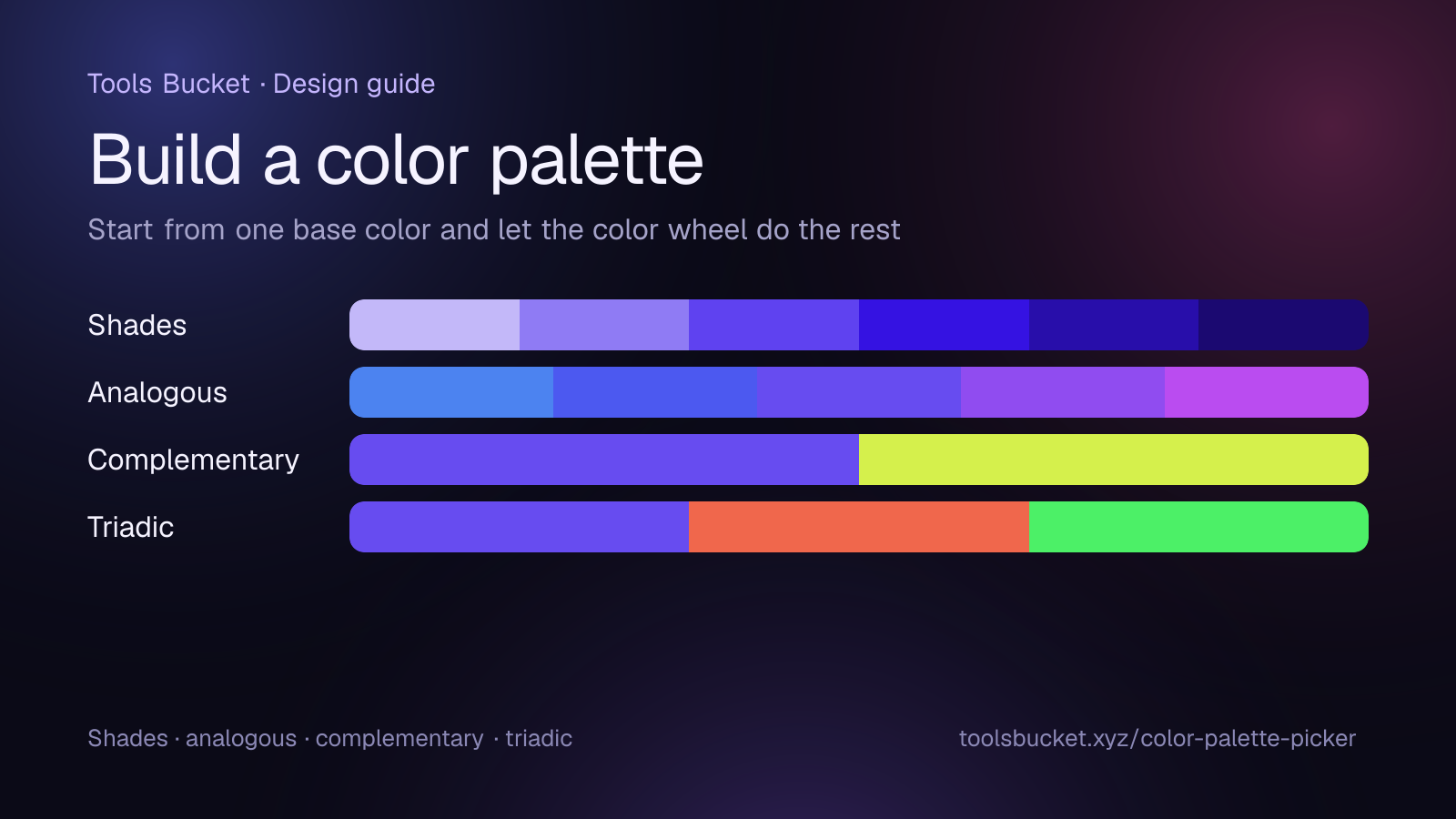
The color wheel arranges hues in a circle, and the classic palette types are simply fixed positions on it. Our free color palette picker builds each of these from any base color you choose.
| Palette type | How it's built | What it feels like |
|---|---|---|
| Shades (monochromatic) | One hue, lighter and darker | Calm, elegant, very hard to get wrong |
| Analogous | Neighbors on the wheel, within about 30° either side | Harmonious and natural, like a sunset |
| Complementary | The color directly opposite (180°) | High contrast and punchy |
| Triadic | Three colors evenly spaced (120° apart) | Lively, playful, balanced |
Shades are the safest choice for beginners: one color in several strengths gives you backgrounds, text and buttons that automatically belong together.
Complementary colors, like blue and orange or purple and yellow, make each other look brighter. That makes them perfect for drawing attention to one thing, such as a "Buy now" button, but tiring if both are used in equal amounts.
Triadic palettes are cheerful and bold, which suits children's brands, games and illustrations. Let one color lead and use the other two as accents.
The 60-30-10 rule
Interior designers have used this rule for decades, and it works just as well on a screen:
- 60% of the space is your dominant color, usually a neutral or a soft version of your base color (backgrounds, walls).
- 30% is a secondary color (cards, sections, furniture).
- 10% is the accent (buttons, links, cushions, highlights).
The small accent share is exactly what makes it pop. If everything is bright, nothing is.
Don't forget the neutrals
Most real palettes are mostly neutral: white, off-white, grays, near-blacks, or warm beiges. They give the eye somewhere to rest and let your main colors do their job. A practical tip: instead of pure gray, use a very dark or very light version of your base color. A near-black with a hint of blue feels richer and more "on brand" than flat #000000.
A typical website palette ends up being just four or five colors:
- A dark neutral for text
- A light neutral for backgrounds
- Your main brand color
- One or two lighter or darker shades of it
- One accent color for buttons and highlights
Make sure people can read it
A beautiful color palette fails if the text is hard to read. The international web accessibility guidelines (WCAG) recommend a contrast ratio of at least 4.5:1 for normal text and 3:1 for large text against its background. You can read the details in the W3C's explanation of contrast requirements.
In practice: dark text on a light background (or the reverse) is almost always safe, while mid-gray on white, or white on yellow, usually isn't.
Color vision matters too. Around 1 in 12 men and 1 in 200 women have some form of color vision deficiency, most often trouble telling red from green. So never use color as the only signal. Add an icon, a label or an underline, especially for errors and links.
A quick trick: look at your design in grayscale (most phones and image editors can do this). If the important parts still stand out, your palette has enough contrast.
Build and test your color palette in five minutes
- Open the color palette picker and pick your base color, or type its hex code.
- Switch between Shades, Complementary, Analogous and Triadic to see what each looks like.
- Click any swatch to copy its hex code.
- Choose one main color, one or two supporting colors and one accent, and add your neutrals.
- Try the palette on a real layout, check the contrast, and adjust.
Save the hex codes somewhere safe, because using the exact same values everywhere is what makes a brand look consistent. When you're ready to print flyers or cards with your new colors, add a QR code that links back to your site.
Quick recap
- Start from one base color chosen for mood, meaning or contrast with competitors.
- Use the color wheel: shades for safety, analogous for harmony, complementary for contrast, triadic for energy.
- Follow the 60-30-10 rule and lean on neutrals.
- Check contrast (4.5:1 for normal text) and never rely on color alone.
- Keep your color palette small: four or five colors used consistently beat ten used randomly.
Comments
No comments yet — be the first to share your thoughts.